ManyOrbs - Crops | Effects | Commands & More! 1.6.0
Create your own orb for you and your players!
1.6.0
Latest 0
0
No ratings yet
Compatibility
Minecraft: Java Edition
1.18 - 26.2
Platforms
Spigot
Paper
Purpur
Changes
Orb Holograms Update
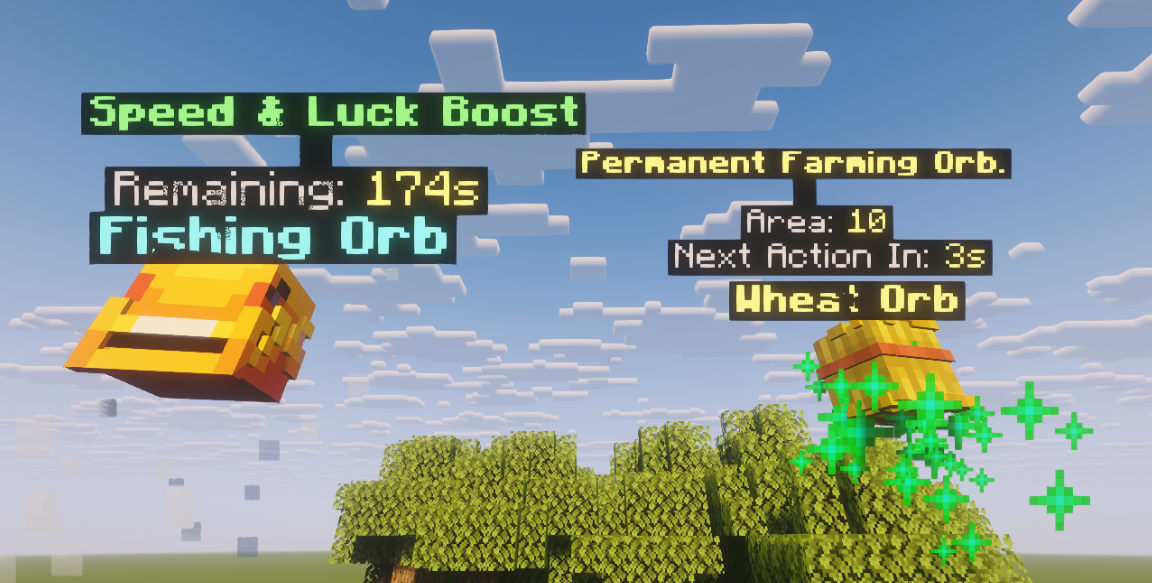
- Added Hologram lines to the orb configuration. Requires DecentHolograms to use. In settings.yml, set Global.Use-DecentHolograms to true to enable it.
- Just add a "hologram" and (optional) hologram-height text list in the orb config. Example:
-
  #Holograms lines, if any, otherwise leave it empty:
  #hologram: []
  hologram:
    - "&e&lPermanent Farming Orb."
    - " "
    - "&7Area: &e%aoe%"
    - "&7Next Action In: &e%nextAction%s"

  #You'll need to change this value if you want the hologram to be placed just above the Orb's name. The Orb name is not an Hologram.
  #Recommended value for 5 lines is 3.085 and 4 lines 2.72. You can modify this, use /orbs reload and then replace the orbs to test the values.
  hologram-height: 2.72
-
- Default config will have this by default now in some orbs.
- All hologram lines will contain the same placeholders as the lore placeholder, with the addition of %remaining%
-
  hologram:
    - "&a&lSpeed & Luck Boost"
    - " "
    - "&7Remaining: &e%remaining%s"
  hologram-height: 2.38
-
- Just add a "hologram" and (optional) hologram-height text list in the orb config. Example:
- All orbs but Dropped can have holograms. Dropped orbs can execute a lot of actions and the display name already shows all the necessary information, so they do not have holograms.
- The holograms are not stored anywhere, they are all loaded from config, so you can turn them on/off anytime without any problems.
- Fixed default tree orb type.
A lot of changes behind this one, please report any issues via Private Message if possible.
ManyOrbs.jar
1.07 MB
Purchase required