Join Screen v1.0
The cinematic welcome experience your server has been missing

JoinScreen
Custom Welcome Screens. Fullscreen Fades. Zero Friction.
━━━━━━━━━━━━━━━━━━━━━━━━━━━━━━━━━━━━━━━━━━━━━━━━━━━━━━━━━━━
2 Screen Types ◆ 54 Slots Each ◆ Fullscreen Fade ◆ 2 Languages ◆ Paper 1.21+
━━━━━━━━━━━━━━━━━━━━━━━━━━━━━━━━━━━━━━━━━━━━━━━━━━━━━━━━━━━
What JoinScreen Solves
Custom Welcome Screens. Fullscreen Fades. Zero Friction.
━━━━━━━━━━━━━━━━━━━━━━━━━━━━━━━━━━━━━━━━━━━━━━━━━━━━━━━━━━━
2 Screen Types ◆ 54 Slots Each ◆ Fullscreen Fade ◆ 2 Languages ◆ Paper 1.21+
━━━━━━━━━━━━━━━━━━━━━━━━━━━━━━━━━━━━━━━━━━━━━━━━━━━━━━━━━━━
What JoinScreen Solves
Most servers drop players straight into the game with nothing but a chat message. There is no first impression, no branding moment, no reason for a new player to stop and look.
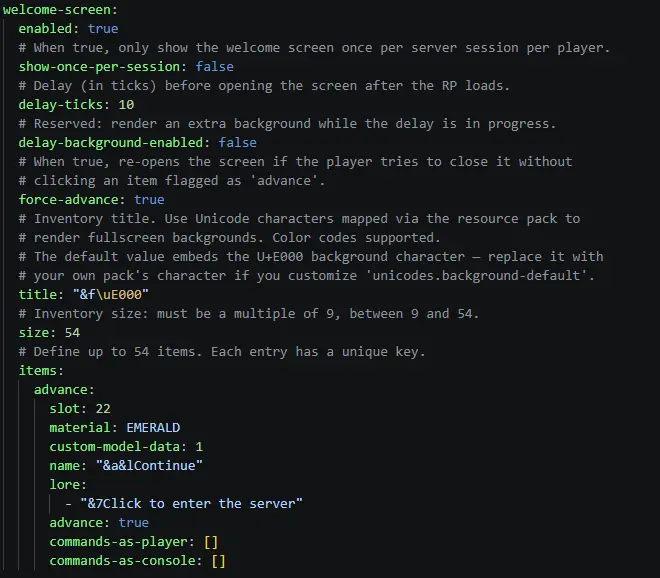
JoinScreen fixes that. When a player joins, they are greeted by a fully customizable GUI welcome screen rendered through your server resource pack. You control every item, every texture, every command that runs when a button is clicked. A separate first-join screen plays once and then switches to the default screen for every subsequent login. Configurable fullscreen fade transitions give the handoff a polished, premium feel.
This is not a chat message. It is an arrival.
━━━━━━━━━━━━━━━━━━━━━━━━━━━━━━━━━━━━━━━━━━━━━━━━━━━━━━━━━━━
How It Works
How It Works
The flow is designed to be seamless from the moment a player connects:
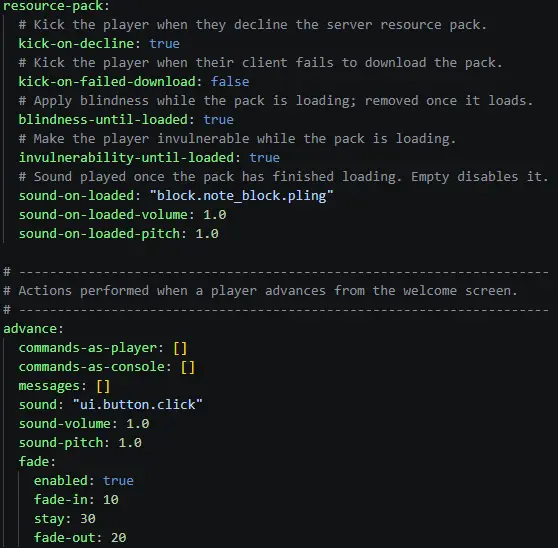
- Player joins - Blindness and invulnerability are applied automatically while the resource pack loads.
- Resource pack loads - A configurable sound plays, effects are removed, and the welcome screen opens.
- Player sees the screen - A chest GUI (up to 54 slots) with custom textures, items, lore, and click actions.
- Player clicks Advance - Commands run, optional fullscreen fade plays, and the player enters the server.
The screen is force-advance by default - players cannot close it without clicking the advance button. Every step is configurable.
━━━━━━━━━━━━━━━━━━━━━━━━━━━━━━━━━━━━━━━━━━━━━━━━━━━━━━━━━━━
Core Features
Core Features
◆ Welcome Screen
- Chest GUI inventory, up to 54 items with full slot control
- Custom item names, lore, material, and CustomModelData per slot
- Per-item commands: run as player or as console on click
- Force-advance mode prevents closing without clicking the advance button
- Configurable open delay, configurable show-once-per-session
◆ First-Join Screen
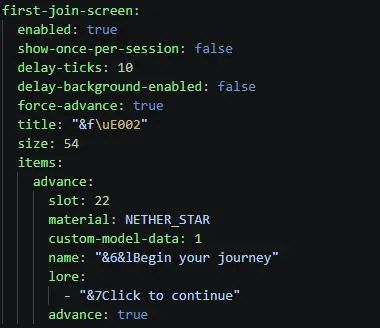
- Separate screen displayed only on a player's very first join
- Persisted in data.yml - never shown again after first advance
- Same full feature set as the default welcome screen
- Ideal for rules, introductions, or character creation flows
◆ Fullscreen Fade
- Configurable fade-in, stay, and fade-out durations in ticks
- Rendered through the resource pack via a Unicode overlay character
- Triggers on advance or manually via /joinscreen fade
- Works with any custom overlay texture you provide
◆ Resource Pack Handling
- Auto-applies blindness and invulnerability until the pack loads
- Kicks players who decline the resource pack with a custom multi-line message
- Configurable kick on failed download
- Plays a configurable sound when the pack finishes loading
- Bundled resource pack template auto-extracts and zips on first run
◆ Chat Customization
- Hide join and quit messages entirely
- Custom join and quit messages with {player} and PlaceholderAPI support
◆ Unicode & Resource Pack Integration
- Configurable Unicode characters for background, fade overlay, and title textures
- Easy integration with Oraxen, ItemsAdder, or any existing resource pack
- Override any Unicode mapping without touching the source code
◆ Multi-Language Support
- 2 built-in languages: English and Polish
- All messages use legacy color codes with hex (RRGGBB) support
- Language switch is a single line in config.yml
- Missing keys fall back gracefully to English
━━━━━━━━━━━━━━━━━━━━━━━━━━━━━━━━━━━━━━━━━━━━━━━━━━━━━━━━━━━
How JoinScreen Compares
How JoinScreen Compares
| Feature | JoinScreen | Typical Join Plugin |
| Welcome screen | Chest GUI, 54 slots, custom textures, per-item commands | Chat message or title only |
| First-join system | Separate screen, persistent across restarts | None |
| Fullscreen fade | Configurable fade in/stay/out via resource pack overlay | None |
| Resource pack handling | Auto-kick, blindness, invulnerability, sound, bundled template | Basic kick or nothing |
| Per-item actions | Player commands, console commands, advance, per slot | One static command |
| Force-advance | Toggleable per screen, re-opens on close | None |
| Integration | Oraxen, ItemsAdder, any RP, PlaceholderAPI | None |
━━━━━━━━━━━━━━━━━━━━━━━━━━━━━━━━━━━━━━━━━━━━━━━━━━━━━━━━━━━
Who This Is For
Who This Is For
- Lobby and hub servers Greet every player with a branded welcome screen before they enter your network. Make the first moment count.
- RPG and adventure servers Show a starting screen with class selection, rules acceptance, or lore introduction on first join. The first-join screen fires exactly once.
- Survival and SMP Present server rules, discord links, or donation info before players enter the world. Force-advance mode guarantees they see it.
- Network owners Single-command install, full reload support, no restarts for config changes. Drop it in any game mode running Paper 1.21+.
━━━━━━━━━━━━━━━━━━━━━━━━━━━━━━━━━━━━━━━━━━━━━━━━━━━━━━━━━━━
Technical Specs
Technical Specs
| Server | Paper 1.21+, Java 21 |
| Dependencies | None. PlaceholderAPI is optional. |
| Storage | YAML flat-file (data.yml) |
| Languages | en_US, pl_PL |
| Resource pack |
Bundled template, auto-extracted and zipped on first run
◆ Commands
| Command | Description | Permission |
| /joinscreen reload (alias /js rl) | Reloads config, language, and screens live | joinscreen.reload |
| /joinscreen show [player] | Force-opens the welcome screen for a player | joinscreen.show (.others) |
| /joinscreen fade [player] | Triggers a fullscreen fade with custom timings | joinscreen.fade (.others) |
◆ Permissions
| Permission | Description | Default |
| joinscreen.reload | Reload plugin configuration | op |
| joinscreen.show | Force the welcome screen for yourself | op |
| joinscreen.show.others | Force the welcome screen for other players | op |
| joinscreen.fade | Trigger a fullscreen fade for yourself | op |
| joinscreen.fade.others | Trigger a fullscreen fade for other players | op |
| joinscreen.* | Grants all JoinScreen permissions | op |
━━━━━━━━━━━━━━━━━━━━━━━━━━━━━━━━━━━━━━━━━━━━━━━━━━━━━━━━━━━
Get JoinScreen
Your players arrive once. Make it memorable.
Two screen types. Fullscreen fades. Every value configurable. One plugin.
Drop it in and have it running in under 5 minutes.
Questions? Ask in our Discord. Feature requests are reviewed.
━━━━━━━━━━━━━━━━━━━━━━━━━━━━━━━━━━━━━━━━━━━━━━━━━━━━━━━━━━━
Get JoinScreen
Your players arrive once. Make it memorable.
Two screen types. Fullscreen fades. Every value configurable. One plugin.
Drop it in and have it running in under 5 minutes.
Questions? Ask in our Discord. Feature requests are reviewed.
━━━━━━━━━━━━━━━━━━━━━━━━━━━━━━━━━━━━━━━━━━━━━━━━━━━━━━━━━━━
Product Info
Statistics
69
Views
0
Purchases
0
Downloads
53.69 KB
File size
16.07.2026
Published
15.07.2026
Updated
Info
Supported software
Supported Versions
1.21 - 1.21.11
Share & Earn
Share and earn part of the profits, an estimated €0.4 per product sale.
Product Image
Links