Warehouse Wars v1.0
Transform your server with exciting storage wars events!


OVERVIEW
WarehouseWars is an auction plugin designed for Minecraft servers running Paper 1.21+. The plugin manages cyclic warehouse auction events where players bid on warehouses containing predefined loot. After winning an auction, players gain temporary access to the warehouse chest to claim their rewards.
FEATURES
Auction System
Event Scheduling
Security
Customization
COMMANDS
Player Commands
Admin Commands
Starting Events
CONFIGURATION
Default language files included:
Custom languages can be added by copying language files to plugins/WarehouseWars/lang/ and configuring the language setting in config.yml.
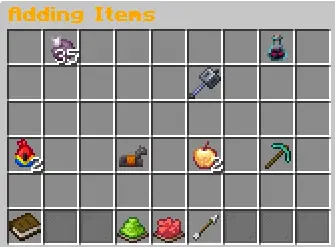
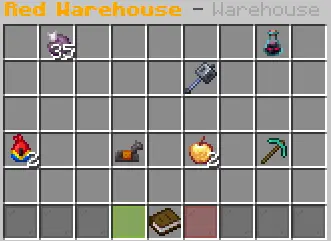
SCREENSHOTS


SUPPORT
WAREHOUSE WARS
Advanced Auction Event Plugin
Sequential warehouse auctions with automated scheduling and real-time bidding
Advanced Auction Event Plugin
Sequential warehouse auctions with automated scheduling and real-time bidding
OVERVIEW
WarehouseWars is an auction plugin designed for Minecraft servers running Paper 1.21+. The plugin manages cyclic warehouse auction events where players bid on warehouses containing predefined loot. After winning an auction, players gain temporary access to the warehouse chest to claim their rewards.
- Automated scheduled events with configurable timing
- Sequential auction system - one warehouse at a time
- Real-time bidding with automatic refunds
- Particle effects marking warehouse locations
- WorldGuard integration for region protection
FEATURES
Auction System
- Sequential auctions - one warehouse per round
- Real-time bidding with instant competition
- Automatic refund system when outbid
- Queue management for multiple warehouses
- Configurable auction duration and break intervals
- Minimum starting prices and bid increments
- Cooldown system to prevent spam
Event Scheduling
- Automated events based on day and time (e.g., Sunday 18:00)
- Configurable countdown announcements (60m, 30m, 10m, 5m, 1m before start)
- Minimum player requirements
- Manual event start option for administrators
Security
- WorldGuard region protection
- Time-limited warehouse access for winners
- Prevention of item deposits into warehouses
- Automatic chest clearing after use
- Access attempt logging
- Automatic backup system before and after events
Customization
- Particle effects on warehouse locations
- Multi-language support (English and Polish included)
- PlaceholderAPI integration for scoreboard/tab displays
- Discord webhook notifications
- Sound effect configuration
- Action bar status updates
COMMANDS
Player Commands
/warehousewars bid <amount>    - Place a bid on current warehouse
/warehousewars info            - View current auction information
/warehousewars mybid           - Check your current bid
/warehousewars queue           - View upcoming warehouses
/warehousewars help            - Show help menu
Aliases: /wh, /ww
Admin Commands
/warehousewars create <name>   - Create new warehouse at target chest
/warehousewars edit <id>       - Edit warehouse configuration
/warehousewars list            - List all warehouses
/warehousewars delete <id>     - Delete a warehouse
/warehousewars startevent      - Manually start event
/warehousewars reload          - Reload configuration
/warehousewars debug <on|off>  - Toggle debug logging
PERMISSIONS
warehouse.auction.use          - Participate in auctions (default: true)
warehouse.admin                - Full administrative access (default: op)
warehouse.command.create       - Create warehouses (default: op)
warehouse.command.edit         - Edit warehouses (default: op)
warehouse.command.delete       - Delete warehouses (default: op)
warehouse.command.reload       - Reload config (default: op)
warehouse.command.startevent   - Start events manually (default: op)
warehouse.command.debug        - Toggle debug mode (default: op)
Creating First Warehouse
- Place chest at desired warehouse location
- Stand within 5 blocks and look at the chest
- Execute /warehousewars create
- Configure starting price and bid increment via GUI
- Add loot items to the warehouse chest
- Optional: Set up particle effects and WorldGuard region
Starting Events
- Manual start: /warehousewars startevent
- Automated: Configure schedule in config.yml (day + time)
- Players bid with /wh bid
- Winner receives access to warehouse chest
CONFIGURATION
# Storage type: "local" or "mysql"
storage:
  type: "local"  # Use "mysql" for production servers

# Auction settings
auctions:
  duration-minutes: 5              # Auction duration
  break-between-seconds: 30        # Break between auctions
  access-time-minutes: 10          # Winner access time
  min-players-online: 0            # Minimum players to start
  allow-multiple-bids: true        # Multiple bids per player
  refund-on-outbid: true          # Refund previous bidder

  security:
    max-access-time: 15            # Maximum access time limit
    prevent-item-deposit: true     # Block item deposits
    auto-clear-after-use: true     # Clear chest after use

  backup:
    backup-before-event: true      # Backup before event
    backup-after-use: true         # Backup after claim
    backup-retention-days: 30      # Backup retention period

# Event scheduling
schedule:
  enabled: true
  day-of-week: "SUNDAY"           # MONDAY to SUNDAY
  time: "18:00"                   # 24-hour format
  announcements:
    - 60  # 1 hour warning
    - 30  # 30 minutes
    - 10
    - 5
    - 1
PLACEHOLDERAPI%warehousewars_auction_active% - Auction status (Yes/No) %warehousewars_auction_time% - Time remaining %warehousewars_auction_warehouse% - Current warehouse name %warehousewars_auction_price% - Highest bid amount %warehousewars_auction_bidder% - Highest bidder name %warehousewars_next_event% - Time until next event %warehousewars_player_bid% - Player's bid amount %warehousewars_warehouses_total% - Total warehousesLANGUAGE SUPPORT
Default language files included:
- English (en_US)
- Polish (pl_PL)
Custom languages can be added by copying language files to plugins/WarehouseWars/lang/ and configuring the language setting in config.yml.
SCREENSHOTS
SUPPORT
- Discord: Discord Server
Product Info
Statistics
57
Views
0
Purchases
0
Downloads
4.87 MB
File size
12.07.2026
Published
12.07.2026
Updated
Info
Server type
Supported software
Supported Versions
1.21 - 1.21.11
Share & Earn
Share and earn part of the profits, an estimated €0.3 per product sale.
Product Image
Links