

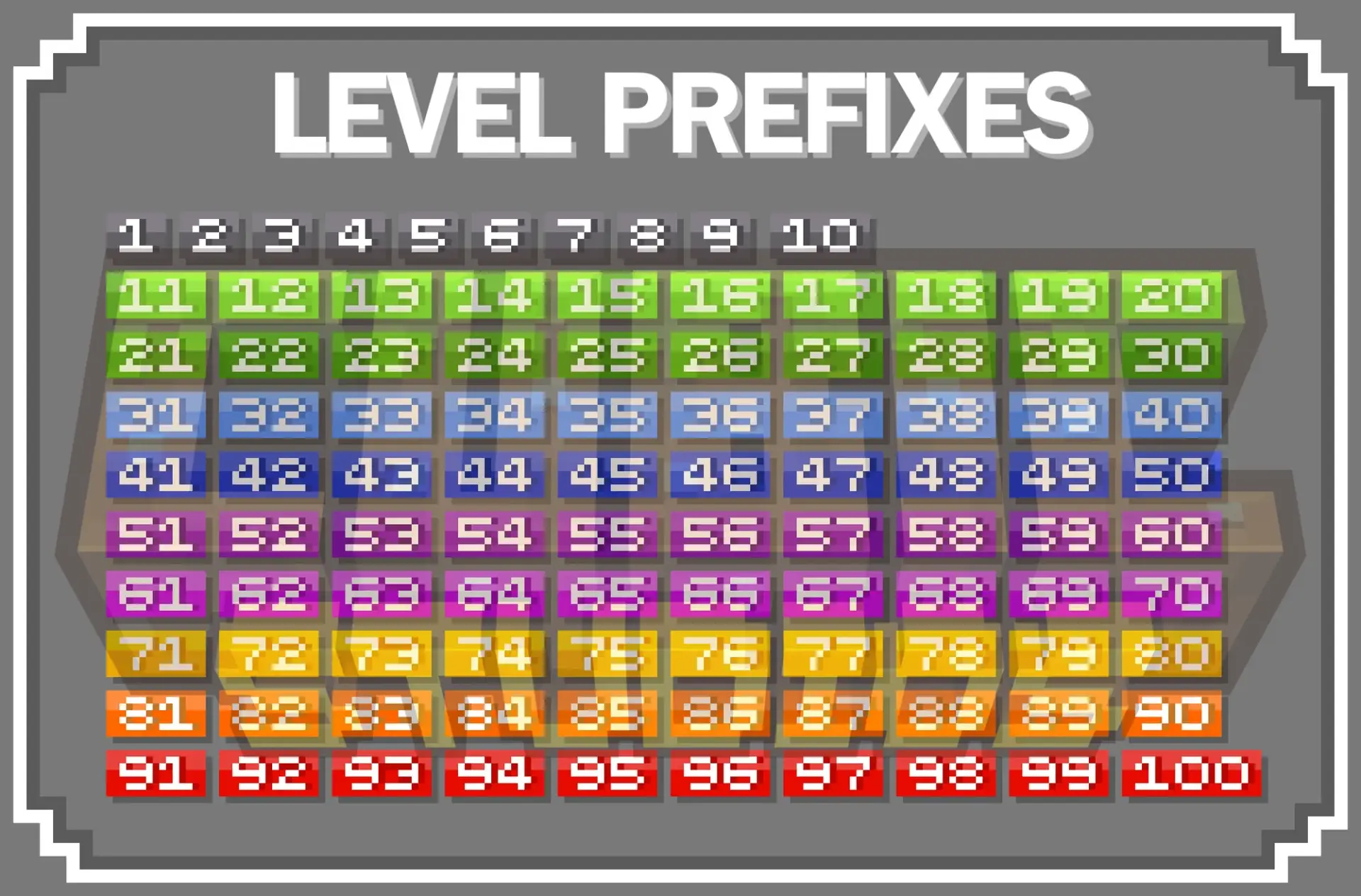
100 Level Icons
Nexo and Itemsadder configuration
About this product
This product was made for Nexo and Itemsadder plugins!
Installation
1. Ensure you have ItemsAdder or Nexo plugins installed on your Minecraft server.
2. Copy the contents of the downloaded ItemsAdder or Nexo folder into the 'plugins/ItemsAdder' or 'plugins/Nexo' directory on your server.
3. Restart your server to apply the changes.
Commands for each plugin
Nexo:
- '/n glyphinfo': Print out all the added icons and their names in Nexo
- '/n reload': Reload the Nexo plugin on your Minecraft server
ItemsAdder:
- '/e': Access all new icons in ItemsAdder
- '/iareload': Reload the ItemsAdder plugin on your Minecraft server
- '/iazip' or '/iaz': Regenerate the ItemsAdder zip file for your Minecraft server
Support
Need help or have feedback? Join our Discord server to connect with our community and get assistance from our team!
Product Info
Statistics
96
Views
0
Purchases
0
Downloads
142.03 KB
File size
14.06.2026
Published
14.06.2026
Updated
Product Image

Links

