Minecraft Server IP Address, Which One to Give Your Players
 Teleriann
8 min read
While connecting to your Minecraft Sever, players from around the world get your public IP address or a domain that points to it. Players that are on the same home network as you use its internal addresses like 192.168.1.20. When you are running server yourself on your computer, all you have to do is type "localhost". If you rented some VPS or server from a host, then you have to send provided adress to your players or point your domain records to it. Default Java Edition port is 25565 and Bedrock's is 19132. With SRV record on your domain, your players do not need to type any port at all.
All of this is for server owners. If you are looking for someone else's server, then you can find their address on website or page listing.
Which IP address should you give to your players
Find the row, that matches your players.
| Who connects | Address to enter | Port |
|---|---|---|
| You, on the PC running the server | localhost | Not needed, localhost on its own is enough |
| A friend from your home network | The server PC's internal IPv4 address, for example 192.168.1.20 | Java uses 25565 by default, Bedrock's port setting defaults to 19132 |
| A player on the internet | Your public IP or your domain | Same defaults. With an SRV record, Java players type no port |
| Anyone joining a hosted server | The IP and port shown in your hosting panel | Send the panel's port along, unless an SRV record covers it |
If you leave server-ip in server.properties blank, then server will listen to all available IP addresses.
Localhost, internal IP and public IP explained
Localhost is the name computer uses for itself. When you type it on your PC, it reaches server that is running there.
Addresses that start with 192.168 come from the private ranges of servers together with 10.0.0.0/8 and 172.16.0.0/12. Your routerhands them to your devices at home and other networks are reusing same ranges as well. Inside of your own network, 192.168.1.20 means your server.
Players that would like to connect and are outside of your network need your public IP, that your internet provider assigns to your connection. Traffic of that players arrives at your router, and then router decides which device inside should receive it. That part is used in port forwarding.
How to find your internal IP
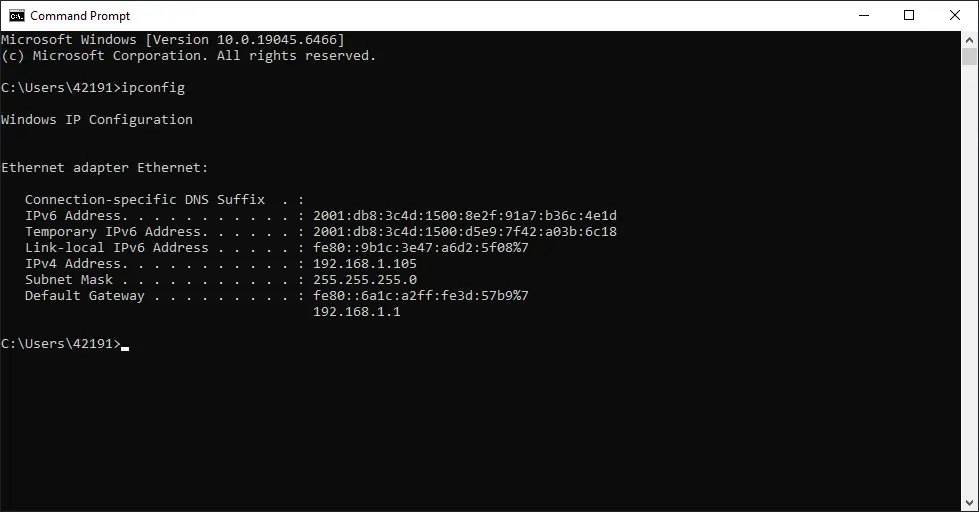
Run this command on the machine that hosts the server.
# Windows, in Command Prompt
ipconfig

# Linux
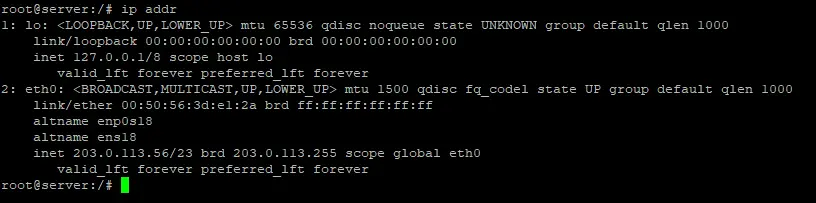
ip addr
On Windows, you can find your internal IP under the IPv4 Address. Default Gateaway is your router.
On Linux, ip addr is the short form of ip address and it lists every network interface on your server. You should look for the line that starts with inet under your main interface, for example eth0 or enp3s0 depends on your system.
How to find your public IP
You can just search "What is my IP" from any device and open website that display it. That address is one that your players need when running server on your PC.
Some of the home connections have dynamic public IP that can change. Address that you share can no longer work in a day or a week, so you should check again if some problem occurs. A domain would make this easier, since you can update one DNS record and players can still connect with same IP.
How to find IP on hosting panel
Hosted servers show their IP directly, if you are running Pterodactyl for example, you can just copy your IP and Port allocated to that server from the Panel itself.

Ports 25565 and 19132 and when you can leave them out
Minecraft Java Edition uses TCP port 25565 by default. Bedrock still uses 19132 as its default port, but since version 26.50 the dedicated server runs on NetherNet instead of the old RakNet. You can find more about the change in our Minecraft Bedrock Crossplay Guide blog post.
If you changed your Bedrock port, you need to tell your players to change while adding server to their server list as well. If you use default port, they can just fill in your address and everything should work.
You can use SRV record on Java Edition to hide your port. It tells Minecraft which IP and port belong to a domain, so players can type play.example.com and nothing else, even when your server uses that port.
Making your server reachable from the internet
You need to do these in order.
- Check your firewall. Either on your own PC or on some hosted server, your machine needs to be reachable from the outside.
- Open ports needed for your server to run. Java edition uses 25565 as default one and bedrock uses 19132 UDP.
- In private nerwork setups, you might need to forward your internal PC address in your router.
- Start the Minecraft server and test the port with a port checker while server is running.
- Give players your public IP and let them play.
Some of the providers are not giving you public IP address, so you might need to check this as well. Happens mostly in smaller villages or bigger houses, where multiple households share one public IP address together.
When you connection is working as it should, performance can still cause a lot of problems. We have prepared another article how to optimize your Minecraft server, where you can check what to change to optimize your own server.
How do you check if the port is open?
Start your server and check if it is running correctly, then run port checker against your public IP and port you used.
After that, best practice is to join your server from outside of your network. You can use your mobile data, VPN or ask your friend to help you out.
Use a domain with an SRV record instead of plain IP
A domain is easier to share, understand and more trustworthy if you use SRV records. All you need to do is to setup these DNS records on Cloudflare or your service provider.
; A record, points a hostname at your server's public IP
mc.example.com.                    3600  IN  A    203.0.113.10

; SRV record, priority 0, weight 5, port 25570, target mc.example.com
_minecraft._tcp.play.example.com.  3600  IN  SRV  0 5 25570 mc.example.com.
Then players just type play.example.com, Minecraft looks up _minecraft._tcp.play.example.com, reads port 25570 and your host which is mc.example.com, then it connects you there.
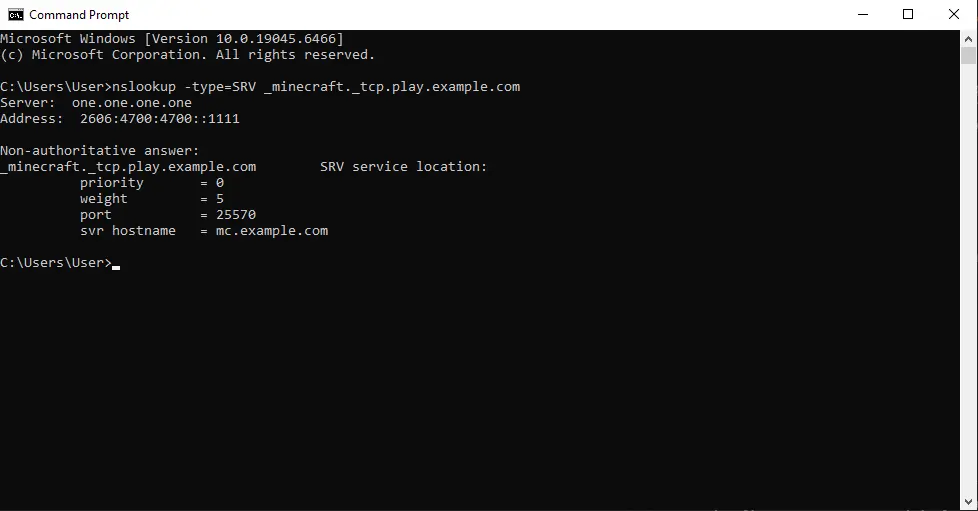
To verify if your record works, you can run this command from any computer.
nslookup -type=SRV _minecraft._tcp.play.example.comWhen you type this command you will find port and target hostname. Both of these should match what you entered, in this example 25570 and hostname mc.example.com. If you cant find any SRV record in the output check if you typed your record right and wait at least 30minutes after you changed them, some providers can be even slower.
Minecraft server IP questions
What IP address do you give for a Minecraft server?
Your public IP if you have hosted server or you are running server for your friends on different network. Internal 192.168.x.x if you are running on same home network and localhost if you are testing your own server on same machine.
What are the IP addresses for Minecraft servers?
There are no shared Minecraft server addresses which can be found directly from Minecraft. Every server has its own, there are public third party pages like votesites, where you can find some of the servers IPs. Most of the server have their own dedicated webpages, where they share their IPs as well.
What is the IP address in Minecraft?
It is string of characters and number which you ender under Multiplayer tab in Minecraft. You need to add server IP before connecting to any minecraft server.
Why can my friends not join with my 192.168 address?
That address works only on your own network. Your friends need your public IP and port in order to connect. You need to allow these in your firewall as well.
Do players need to type port 25565?
They do not need to type it out with SRV record. Without one players always need to type your port if you do not use default one which is 25565.
Server setups and configs on PixelEast
If you managed to get your addresses working, the server is next. Starting from ready-made Minecraft server setups to specific plugin Minecraft server configs. You might also need some spawn area as well, look up our lobby builds which cover that part of the server.
Keep reading
More from the PixelEast blog.

· 19 min read
Minecraft Bedrock Crossplay Guide
A complete guide to Geyser and Floodgate, opening the Bedrock port, and getting phone and console players onto your Java server.
Teleriann
Read

· 14 min read
Minecraft Schematics Guide
A complete guide to .schem and .schematic files, FastAsyncWorldEdit commands, and pasting builds into your Minecraft server.
Teleriann
Read

· 11 min read
The 5 Best Minecraft Plugin Marketplaces in 2026 (Tested & Compared)
Where to buy Minecraft plugins, server setups, configs and builds. PixelEast, BuiltByBit, SpigotMC, MCModels and voxel.shop compared from the buyer side.
Teleriann
Read

Start selling your products
Join PixelEast as a Creator and reach Minecraft and Hytale server owners worldwide. Already selling elsewhere? We move your products over for you.